 Sideline SideKick Tracker
The Booth and Coach’s Read
Two screens that exist because the play log is worth more than a stat sheet. The Booth is where your staff writes down what it is seeing. Coach’s Read is what the plays you have already logged say about your own calling. Neither is ever shown to a fan.
Whatever you’d shout down to the sideline, typed once
Your best assistant is upstairs with the best view in the stadium and no good way to get what he sees to the man calling plays. The Booth is a shared notepad for one game: he types it, the whole staff has it, and nobody had to answer a phone.
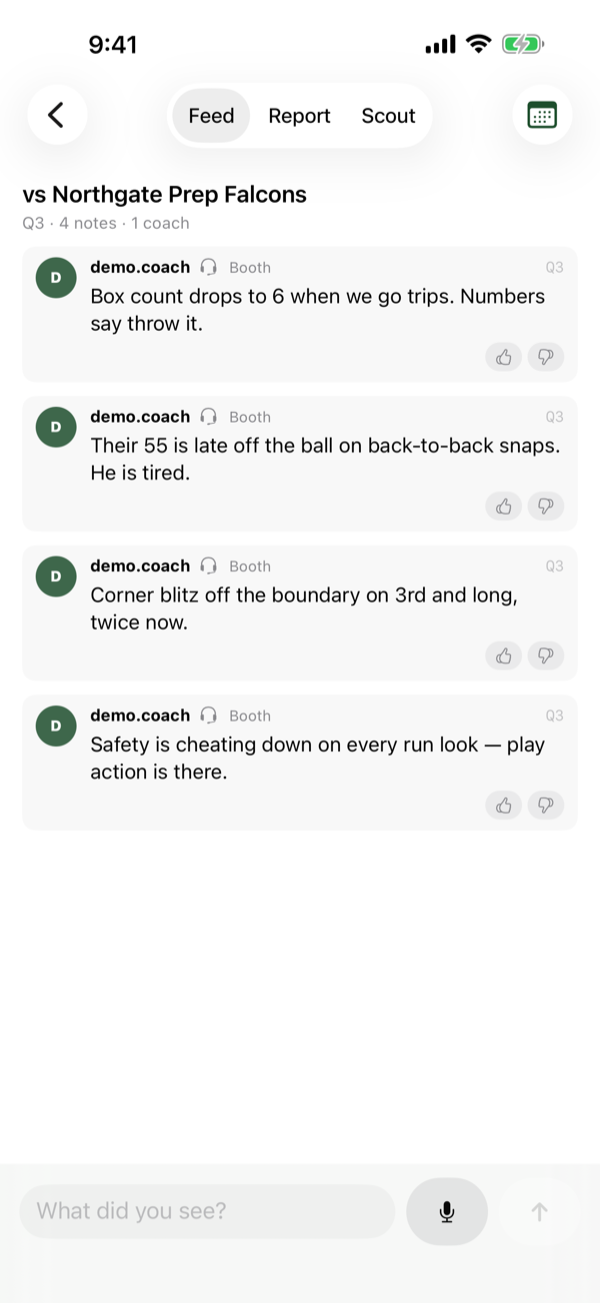
That is a real third quarter. The notes in it are the kind that actually change a call — “Box count drops to 6 when we go trips. Numbers say throw it”, “Corner blitz off the boundary on 3rd and long, twice now”, “Safety is cheating down on every run look — play action is there”. None of that survives being remembered until halftime.
Four things shape it
Eight seconds
A coach with a thought between plays has to get it down and look up again. One line, a microphone if his hands are full, post.
Who saw it, and from where
Every note carries a name, a post — booth or field — and a quarter. An unattributed observation is a rumour. A coordinator deciding whether to slide protection needs to know who saw it.
It works with no signal
Nothing on the screen waits for a server, which is the normal state of a press box on a Friday night.
It is about tonight
Notes belong to one game and stay there. What their safety did on the second series is not next week’s problem.
At halftime it files itself. The Report tab turns the night’s notes into a card you can walk into the locker room with, instead of scrolling a feed in front of forty kids.
The full Booth guide covers the feed filters, the report and the scout tab, and how the owner turns it on.
Your own tendencies, off your own plays
This is not scouting somebody else. You are already keeping the play-by-play; Coach’s Read is what that record is worth once there is enough of it. Which calls are moving the ball, which have stopped, and what an opposing coordinator with a notepad can already tell about you. All of it computed on your own phone from your own game.
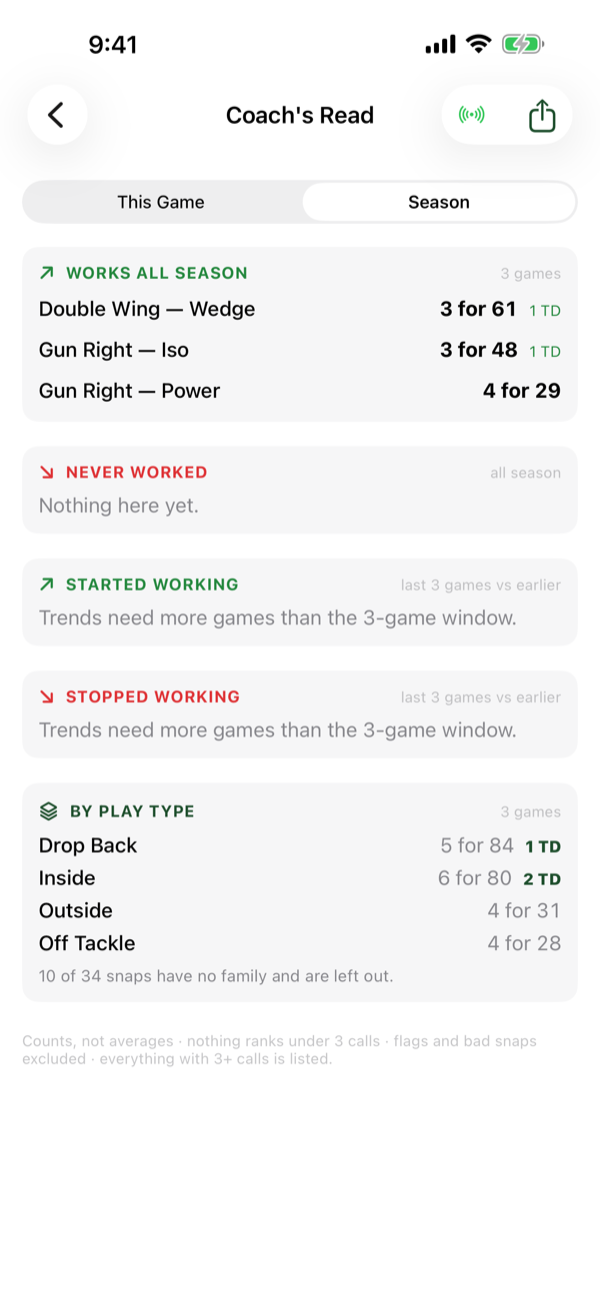
Three games into a season that reads: Double Wing Wedge is 3 for 61 with a touchdown, Gun Right Iso 3 for 48 with a touchdown, and by play type your drop back game is 5 for 84 while inside runs are 6 for 80 with two scores. Nothing has landed in NEVER WORKED yet, and both trend sections say plainly that three games is not enough of a window to call a trend.
The rules it plays by, printed on the screen
| Rule | Why |
|---|---|
| Counts, not averages | “6 for 41” is a thing a coach can hold in his head. “6.8 yards per carry” is a thing he has to unpack. |
| Nothing ranks under 3 calls | Two carries for 22 is not a read, it is a long run. A read you cannot trust is worse than none. |
| Everything with 3+ calls is listed | Once a call clears the floor the screen does not pick favourites. |
| Flags and bad snaps excluded | One holding call should not make your best play look broken. |
| Nothing before about 10 plays | The three-call floor, applied to the game as a whole. |
It also tells you what it left out — the screenshot above says “10 of 34 snaps have no family and are left out” rather than quietly computing off 24 and letting you think it used everything.
Two doors, and they open differently. From the game screen it opens on This Game, because that is the between-series glance it exists for. From the home screen it opens on Season, because a coach reaching for it on a Tuesday is asking about the year.
The full Coach’s Read guide walks through every section, including what an opposing coordinator would see.
Who can see them
Both are staff screens. A fan — the role an invite code hands out — cannot reach either one, and that is enforced by the database rather than by hiding a button. The Booth says so in its own empty state if a fan somehow arrives at it.
The owner controls both from Team Settings. The Booth is off by default and has to be turned on; off, it is not in the app at all for that team. Coach’s Read can be switched off for the whole staff the same way.
Both are included with a coach subscription. There is nothing extra to buy, and every coach on the staff gets them — not only the one who paid.
Try it with your staff this season.
The Booth needs two coaches and a phone each. Coach’s Read needs about ten plays.